


A modern business website should do more than look good.
It should work.
For many organizations, that means connecting the website directly to the software already running the business—CRM platforms such as Salesforce, marketing automation systems, ecommerce platforms, payment processors, scheduling applications, internal databases, and other third-party tools.
Through custom web development, API integration, and CRM automation, your website can become an active part of your business operations rather than simply another place where information lives.
At Boldwerks, we increasingly approach web design this way: design the customer experience on the front end while considering what needs to happen behind the scenes from the beginning.
What Is API Integration in Web Design?
An API, or Application Programming Interface, allows two different software platforms to securely exchange information and trigger actions.
Think about a standard website contact form.
On a basic website, someone fills out a form, an email gets sent to an employee, and that person manually enters the information into the company’s CRM.
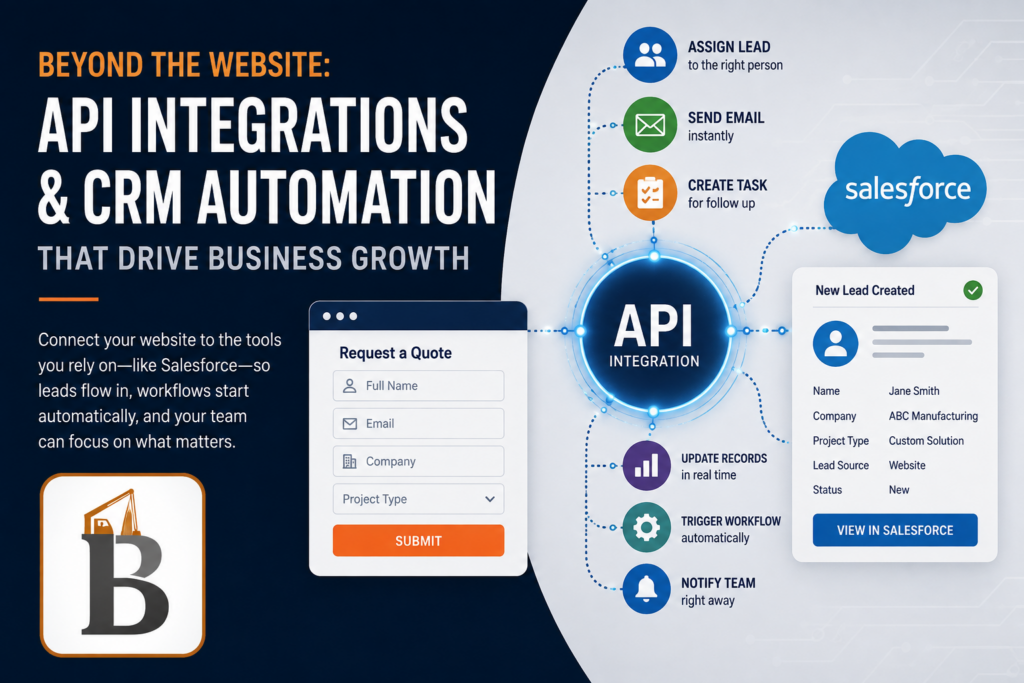
With an API integration, that same website submission could automatically:
- Create or update the contact in Salesforce
- Assign the lead to the appropriate salesperson
- Record the service or product the visitor was interested in
- Trigger an automated email
- Create a follow-up task
- Notify the appropriate team
- Start a sales or marketing workflow
- Pass information to another internal business system
Instead of simply collecting information, the website becomes the starting point for an automated process.
Salesforce, for example, offers a broad collection of APIs specifically designed to allow websites, applications, databases, and other systems to exchange data with the Salesforce platform.
Your Website and CRM Shouldn’t Operate Separately
One of the most common problems we see is a collection of systems that all work—but don’t work together.
A company might have:
Website → Contact Forms → Email → Salesforce → Email Marketing → Accounting → Internal Software
When each platform operates independently, employees become the integration.
Someone downloads a spreadsheet.
Someone copies information from an email.
Someone enters the same customer into two systems.
Someone forgets to update a record.
Someone has to figure out why the website says one thing while the CRM says another.
The goal of a good integration strategy is to remove as many of those unnecessary steps as possible.
A better workflow might look like:
Website → API → Salesforce → Automated Workflow → Sales Team
The customer doesn’t notice all of the technology operating behind the scenes.
They simply experience a faster, smoother process.
Salesforce Website Integration
Salesforce is one of the most common CRM platforms we encounter when developing websites for larger organizations, manufacturers, professional services firms, B2B companies, and organizations with established sales teams.
Because Salesforce provides extensive API capabilities, there are numerous ways a website can interact with it. Salesforce’s current integration tools include REST APIs as well as additional platform APIs and integration technologies for connecting external applications and data sources.
For example, we can build workflows where a WordPress website sends qualified leads directly into Salesforce.
But the integration doesn’t have to stop at:
Name
Email
Phone
A properly designed integration can provide the sales team with valuable context.
Imagine receiving a Salesforce lead containing:
Contact: John Smith
Company: ABC Manufacturing
Service: Custom Manufacturing
Location: Massachusetts
Estimated Project: $100,000+
Product Interest: Product Line B
Original Source: Google Organic Search
Landing Page: Custom Manufacturing Services
Requested Action: Schedule Consultation
Your salesperson now knows significantly more about the opportunity before making the first call.
Automating What Happens Next
Getting data into the CRM is only part of the equation.
The real efficiency comes from determining what should happen once it gets there.
Salesforce Flow, for example, can automate processes such as updating records, creating follow-up tasks, sending communications, and triggering other business actions.
That means a website inquiry could initiate an entire workflow.
For example:
1. Visitor submits a website form
The customer requests information about a service.
2. Website validates and sends the information
The website uses an API to securely transmit the submission.
3. Salesforce creates the lead
Contact information and website-specific data populate the appropriate CRM fields.
4. Salesforce evaluates the lead
Rules determine location, service category, lead value, territory, or other criteria.
5. The correct salesperson is assigned
No one has to manually forward the inquiry.
6. An immediate response is triggered
The prospect receives confirmation while the sales representative receives a notification.
7. A follow-up task is created
If nobody contacts the prospect within the appropriate timeframe, the CRM can continue the workflow.
Suddenly, your website isn’t simply generating leads.
It’s helping manage them.
API Integrations Go Far Beyond Salesforce
CRM integration is only one example.
APIs can connect a website with almost any modern platform that provides an appropriate interface.
Depending on the organization, that might include:
HubSpot and Other CRM Platforms
Automatically create contacts, update properties, associate companies, track lead sources, or initiate marketing workflows.
Ecommerce Platforms
Connect WooCommerce, Shopify, or other ecommerce systems with inventory management, fulfillment, accounting, ERP, vendor, and CRM platforms.
Payment Processors
Integrate Stripe, Authorize.net, PayPal, or specialized payment platforms into custom purchasing or account workflows.
Scheduling Systems
Allow customers to book appointments while synchronizing availability and customer information with another platform.
Email Marketing Platforms
Automatically add and segment contacts based on website activity rather than manually importing lists.
Internal Databases
A website can retrieve or submit information directly to a company’s proprietary software or database.
ERP and Inventory Systems
Product availability, pricing, order information, customer accounts, or fulfillment data can be synchronized between systems.
Third-Party Data Sources
APIs can also retrieve information rather than simply send it.
A website application could incorporate mapping data, weather information, financial data, product databases, shipping calculations, or other external information into a custom online tool.
Web Design Is Increasingly About Workflow Design
This is where the definition of web development has changed.
Years ago, the primary discussion surrounding a new website might have focused on:
- Navigation
- Page layouts
- Photography
- Copy
- Contact forms
Those things still matter enormously.
But businesses today are also asking:
What happens when someone submits this form?
Can this connect to Salesforce?
Can customers log in and see information from our database?
Can the website automatically generate a document?
Can information entered here update another system?
Can we eliminate this manual process?
These questions need to be considered during the planning stage—not after the website has already been designed.
WordPress as an API Integration Platform
One reason we frequently recommend WordPress for business websites requiring custom integrations is its flexibility.
WordPress can function as much more than a content management system.
Through a combination of WordPress’s REST capabilities, custom PHP development, JavaScript, webhooks, third-party APIs, and custom databases, it can serve as the user-facing layer for much more sophisticated applications.
We’ve previously discussed this flexibility when comparing WordPress with more closed website platforms: if a website may eventually need to behave more like a custom business platform, the ability to implement custom functionality and API integrations becomes increasingly important.
That’s particularly valuable when you don’t know exactly what the website will need to do three years from now.
Native Integration vs. Zapier vs. Custom API Development
Not every integration needs to be custom coded.
Part of good web development is choosing the simplest reliable solution for the problem.
Plugin or Native Integration
If a reliable native integration already accomplishes exactly what you need, there may be no reason to reinvent it.
Zapier or Similar Automation Tools
Middleware platforms can be extremely useful for straightforward workflows:
Website Form → CRM
New Order → Google Sheet
New Lead → Email Notification
They’re relatively quick to deploy and easy to modify.
Custom API Integration
Custom development becomes more valuable when the workflow involves:
- Complex business rules
- Multiple connected systems
- Large amounts of data
- Custom authentication
- Two-way synchronization
- Proprietary databases
- Custom customer portals
- Advanced ecommerce requirements
- Detailed error handling
- Highly specific Salesforce objects or fields
The answer isn’t automatically “custom development.”
The answer is choosing an architecture that makes sense for the organization.
Two-Way Website and CRM Integration
Integrations don’t necessarily have to move information in only one direction.
A website can potentially both send information to and retrieve information from a CRM or other system.
For example, a customer portal might allow a customer to log into a website and see:
- Account information
- Project status
- Orders
- Documents
- Service history
- Available products
- Account-specific pricing
That data might actually live inside Salesforce or another internal platform rather than WordPress.
When the customer updates something on the website, that change can then be transmitted back to the appropriate system.
Salesforce’s REST APIs are specifically designed to allow external applications to work with Salesforce data and operations, enabling this type of application architecture.
Automation Also Improves Data Quality
Automation isn’t only about saving time.
It can improve the quality of the information your company collects.
Manual entry introduces inconsistencies.
One employee enters:
New Hampshire
Another enters:
NH
Someone else enters:
N.H.
An API-driven process can normalize that information before it reaches the CRM.
Website validation can ensure required information is collected in the correct format, while integration logic determines exactly where that information should go.
That creates cleaner data, better reporting, and more reliable marketing automation.
Better Data Means Better Marketing
There’s also an important connection between web development, CRM integration, and digital marketing.
Consider a visitor who arrives through Google after searching for a specific service.
Instead of simply sending their name and email address to Salesforce, the website could potentially capture additional attribution and behavioral information.
That allows the organization to understand:
- Which marketing channel generated the lead
- Which landing page converted
- Which service generated the inquiry
- Which campaigns produce valuable customers
- Which types of leads ultimately result in sales
This closes an important gap between SEO, website performance, lead generation, and actual revenue.
And that’s when marketing data becomes much more useful.
What Makes an API Integration Successful?
The technical connection is only one part of a successful project.
Before writing code, we want to understand the business process.
That usually means answering questions like:
Where does the information originate?
Which system should ultimately own the data?
Which fields need to be synchronized?
Does information travel in one direction or both directions?
What should trigger the automation?
What happens if the API isn’t available?
Who should be notified if something fails?
How should duplicate contacts be handled?
What authentication and permissions are required?
Security is especially important. Salesforce, for example, recommends appropriately scoped access when external applications connect to Salesforce so integrations only have access to the data and operations they require.
Planning these details properly is what separates a dependable business integration from something that works during the initial demo and creates headaches six months later.
Your Website Should Make Your Business More Efficient
There’s still tremendous value in great design.
Your website needs to communicate your brand, establish credibility, rank in search engines, and create an excellent experience for visitors.
But businesses should expect more from their websites.
If your employees are constantly moving information from your website into Salesforce…
If you’re exporting and importing spreadsheets…
If website leads need to be manually routed…
If customers are calling because information exists internally but isn’t available online…
Or if you’re maintaining the same information in several different platforms…
there may be an opportunity to connect those systems.
Web Design, API Integration and CRM Automation in New Hampshire and Massachusetts
Boldwerks develops custom WordPress websites and digital platforms for businesses throughout New Hampshire, Massachusetts, Maine, and New England, combining strategy, design, development, SEO, ecommerce, and custom functionality.
Our development work can include custom API integrations, CRM integrations, Salesforce connectivity, ecommerce integrations, database integrations, automated workflows, and custom WordPress development.
We’ve also built increasingly complex ecommerce environments where API integration and custom development become central to the platform rather than an afterthought.
Whether you’re planning a completely new website or looking for ways to make an existing website communicate more effectively with Salesforce or another business platform, the first step is usually mapping out the workflow.
What information do you have? Where does it need to go? And what are people currently doing manually that software could be doing automatically?
Those three questions can uncover some of the biggest opportunities to make your website—and your business—work better.
Need a website that does more than look good?
Talk to Boldwerks about web design, custom WordPress development, API integrations, Salesforce integration, CRM automation, and ecommerce development for your next project.